
Remix a sample
Written against the alpha (September 2026). The screens may change without notice. The app is currently in Japanese; labels are quoted as they appear, with translations.
The five samples on showcase open directly in ESKEES Studio. You don't need to read any script — change the images and a few numbers and it's your game.
ESKEES Studio is opening to people on a waitlist. Sign up from 「これを改造してみる」 (Try remixing this) on a sample's page, and you can open that sample as soon as you're let in.
1. Open the sample
- Play a sample on showcase, then press 「これを改造してみる」→「Studio で開く」 (Open in Studio) on the right.
- Studio starts with the sample open. (If you haven't been let in yet, you'll land on the waitlist page instead.)
- Save your own copy right away with 「ファイル ▾」→「プロジェクトを保存」 (Save project).
2. Swap an image
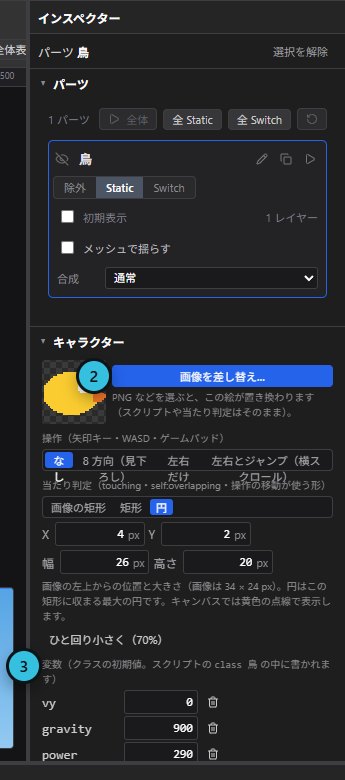
- Select the part to change in the hierarchy on the left (for Patapata, 「鳥」 — the bird).
- Open 「キャラクター」 (Character) in the inspector and choose a PNG with 「画像を差し替え…」 (Replace image). The script and hitbox stay as they are.
- If the new image is a different size, adjust 「当たり判定」 (Hitbox) in the same section. 「ひと回り小さく(70%)」 (70% size) makes collisions feel fairer.
3. Change the numbers
- At the bottom of the same Character section is 「変数」 (Variables) — the character's weight, speed and so on.
- Change a value, try it with 「テストプレイ」 (Test play), and find what feels right. Press Esc to stop.
- Stage goals and overall speed are the
varnumbers at the very top of 「ロジック」→「テキスト」 (Logic → Text).
4. Publish
- Export with 「エクスポート ▾」→「.eskx をエクスポート」.
- Upload the file and a thumbnail from 「作品を投稿」 (Post a work) on showcase. Mention which sample you remixed in the description.
What to change in each sample
Patapata
- Images — the bird (「鳥」), pipes (「土管」), clouds (「雲」), ground (「地面」) and sky (「空」).
- Weight and flap — the bird's variables
gravity(higher falls faster) andpower(higher flaps higher). - Hitbox — the bird's hitbox is a circle; resize it if you change the image.
Catch the Stars
- Images — the basket (「かご」) and the stars (「星」).
- Movement — the basket is set to move left/right in the inspector's Character section; its hitbox is there too.
- Stages —
goal1–goal3(stars to catch) andfall1etc. (fall speed) at the top of Logic → Text.
Tetris
- Stages —
goal1–goal3(lines to clear) andfall1–fall3(drop interval; smaller is faster) at the top of Logic → Text. - Block colors — replace the images of the parts I, O, T … to change how the blocks look.
ARROW RUN
- Hero — Ranger moves left/right via the Character section (speed 310). Swap its image there too.
- Enemy strength — Enemy's variables
hp(health) andgrow(how much health grows as you advance).
NIGHT SURVIVOR
- Hero — moves in 8 directions with a circular hitbox. Change its speed and image in the same section.
- Enemy strength — the variables of Ghoul, Bat, Brute and Reaper set each enemy's base strength.
For the whole of Studio, see Getting started with ESKEES Studio.